




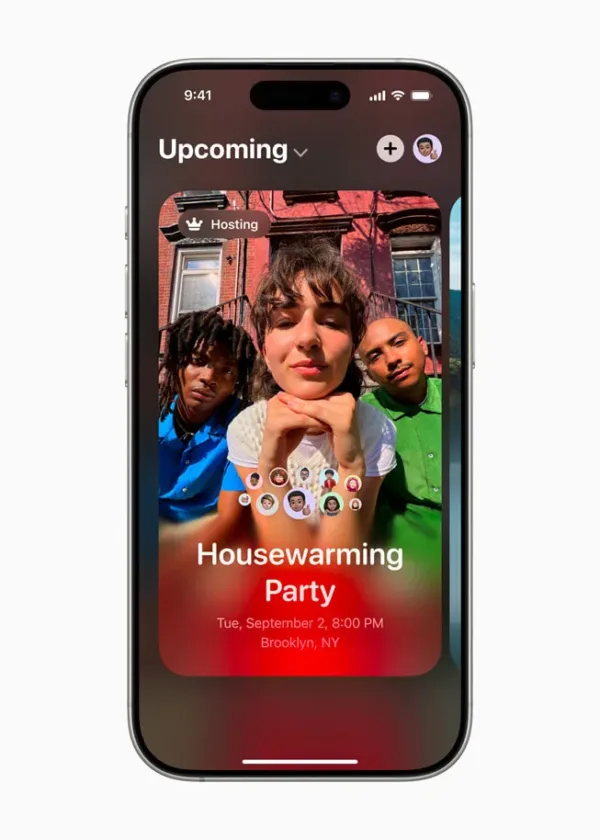
Apple has launched the Apple Invites app, a new event planning tool designed to simplify how people organise and manage gatherings. Available for download on the App Store and accessible via the web at icloud.com/invites, the app enables iPhone users to create custom event invitations that can be shared effortlessly with friends and family. This latest addition to Apple’s ecosystem enhances the event planning experience by integrating features from Apple Music, iCloud, and Maps, while offering advanced functionalities powered by Apple Intelligence.
The Apple Invites app is available to all iPhone users running iOS 18 or later. While invitation creation requires an iCloud+ subscription, RSVPs can be managed by anyone, regardless of whether they own an Apple device or have an Apple account. This cross-platform flexibility positions Apple Invites as more than just an app—it’s a comprehensive event planning tool designed to foster meaningful connections before, during, and after special occasions.

What is Apple Invites and how does it work?
The Apple Invites app is designed to make event planning more intuitive and personalised. Users can start by selecting images from their photo library or choosing from a curated gallery of event-themed backgrounds. Apple’s seamless ecosystem comes into play through integrations with Maps and Weather, ensuring guests receive accurate directions and real-time weather updates for the event day.
One of the standout features of Apple Invites is its Shared Album integration. Guests can contribute photos and videos related to the event, creating a collaborative digital memory book accessible to all attendees. Additionally, Apple Music subscribers can curate playlists specifically for events, which are easily accessible through the app. This integration adds a personal touch, allowing hosts to set the tone and atmosphere even before the event begins.
How does Apple Intelligence enhance event invitations?
A key differentiator for the Apple Invites app is the integration of Apple Intelligence, Apple’s proprietary AI technology. The app includes a feature called Image Playground, allowing users to generate original images for their invitations. By inputting concepts, descriptions, or even selecting people from their photo library, users can create unique visuals that reflect the theme and mood of their events.
Apple Intelligence also extends to the app’s Writing Tools, helping users craft the perfect invitation message. Whether it’s a formal corporate event or a casual birthday party, these tools assist in finding the right tone and phrasing. The AI-driven features not only streamline the invitation process but also ensure each invite feels personal and thoughtfully designed.
What makes Apple Invites different from other event planning tools?
While numerous event planning apps exist, the Apple Invites app distinguishes itself through its deep integration with Apple’s ecosystem. Hosts have full control over their events, from managing guest lists and tracking RSVPs to customising invitation previews with event-specific backgrounds and personal details. Invitations can be shared via simple links, making it easy for both Apple and non-Apple users to respond.
Privacy and user control are central to the app’s design. Guests can manage their visibility settings, deciding what information they share with others. They also have the option to leave or report events, adding an extra layer of security. Unlike traditional event management platforms, Apple Invites combines robust event organisation tools with Apple’s signature focus on privacy and user experience.
What premium features are available for iCloud+ subscribers?
While the basic functionalities of the Apple Invites app are accessible to all users, iCloud+ subscribers benefit from additional premium features. These include expanded cloud storage, which allows users to securely store high-resolution photos, videos, and files accessible across all devices.
Subscribers also enjoy enhanced privacy tools, such as Private Relay, which ensures browsing activity in Safari remains private even from Apple. The Hide My Email feature generates unique, random email addresses for increased privacy when sending invitations. Additionally, HomeKit Secure Video enables secure recording and reviewing of home security footage, while custom email domains allow users to personalise their iCloud email addresses.
iCloud+ plans start at $0.99 per month, with the option to share subscriptions with up to five family members. This subscription model not only enhances the event planning experience through Apple Invites but also adds value across Apple’s broader ecosystem of services.
Is Apple Invites available worldwide?
The Apple Invites app is now available for all iPhone models running iOS 18 or later. Users can download it from the App Store or access it via the web at icloud.com/invites. While the core features are widely available, some functionalities may vary depending on the user’s region or language preferences. Apple continues to expand support to ensure a consistent experience across global markets.
With Apple’s track record of seamless software and hardware integration, the Apple Invites app represents another step toward creating a more connected digital ecosystem. Whether planning a small family gathering or a large corporate event, Apple Invites offers an intuitive, secure, and feature-rich platform designed to enhance the way people come together.
Discover more from Business-News-Today.com
Subscribe to get the latest posts sent to your email.